In this article, we will explain how to zoom in on the KANNA screen in the PC version.
This can be useful when you want to view photos in greater detail.
There are two methods to zoom in on the screen.
① Using the Touchpad of the laptop
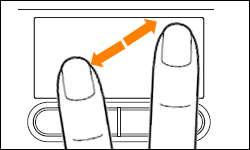
(Image source: https://dynabook.com/assistpc/faq/pcdata/011061.htm)
② Using the Magnifier Feature
By using shortcut keys, a magnifier like the one below will appear.
-
Windows
Windows logo key + plus sign (+)
-
Mac